How To Download Sodium For Minecraft 26.1 (2026 Guide)
 mcpecentraladmin
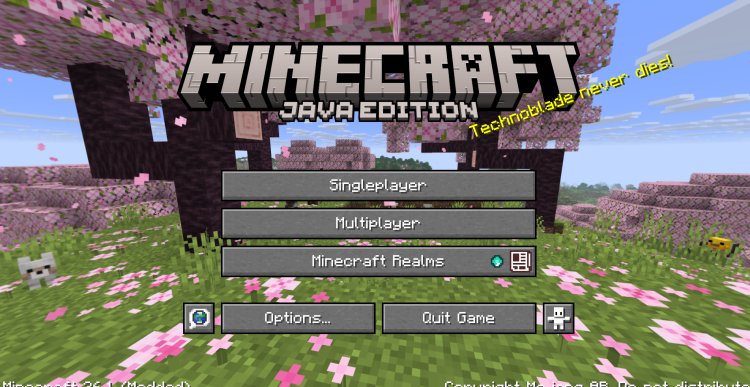
How To Download Sodium For Minecraft 1.21.6 (2025 Guide)
The ultimate step-by-step guide to installing the Sodium mod for Minecraft using Fabric Mod Loader — boost your FPS and optimize your game today!
What Is Sodium For Minecraft?
If you're looking to massively boost your Minecraft FPS, reduce lag, and optimize your game performance, Sodium is the #1 mod you need to install. Sodium is a free, open-source rendering optimization mod for Minecraft that replaces the default rendering engine with a far more efficient one. Whether you're playing on a low-end PC or a high-end gaming setup, Sodium dramatically improves frame rates and reduces stuttering.
This guide will walk you through exactly how to download and install Sodium for Minecraft 26.1 step by step — including downloading Fabric Mod Loader, Java 21, and the Sodium mod itself.
What You Need To Install Sodium For Minecraft 26.1
Before we get started, here's everything you'll need:
- Minecraft Java Edition
- Java 21 or above
- Fabric Mod Loader
- Sodium Mod (for Minecraft 26.1)
Step 1: Download Fabric Mod Loader
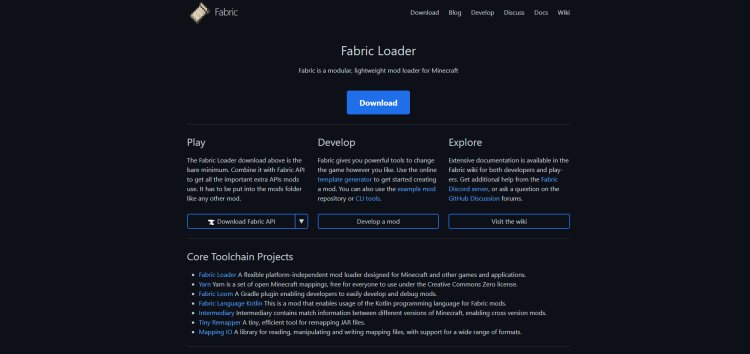
The first thing you need to do is download Fabric Mod Loader. Fabric is a lightweight, open-source modding toolchain for Minecraft that allows you to run mods like Sodium. Without Fabric, Sodium will not work.
Download Fabric Mod Loader here: https://fabricmc.net/
Head to the Fabric website and download the latest Fabric Installer. Make sure you're downloading the version compatible with Minecraft 26.1.
Step 2: Download the Sodium Mod for Minecraft 26.1
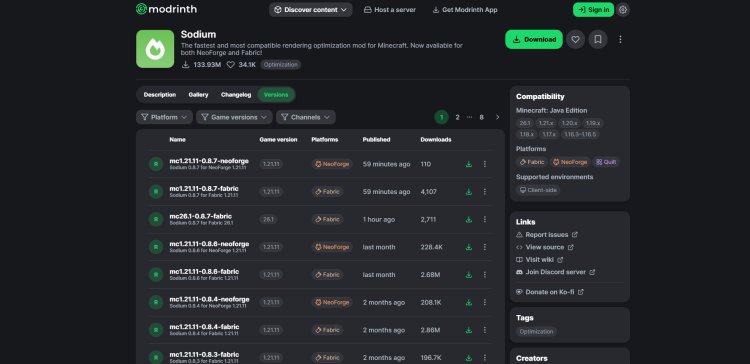
Next, you'll need to download the Sodium mod itself. Sodium is hosted on Modrinth, which is one of the most trusted mod repositories for Minecraft.
Download Sodium Mod here: https://modrinth.com/mod/sodium/versions
Important: When downloading Sodium, make sure you select the version that is compatible with Minecraft 26.1. Downloading the wrong version will cause the mod to not load properly or crash your game.
Step 3: Download Java 21 (Required for Minecraft 26.1)
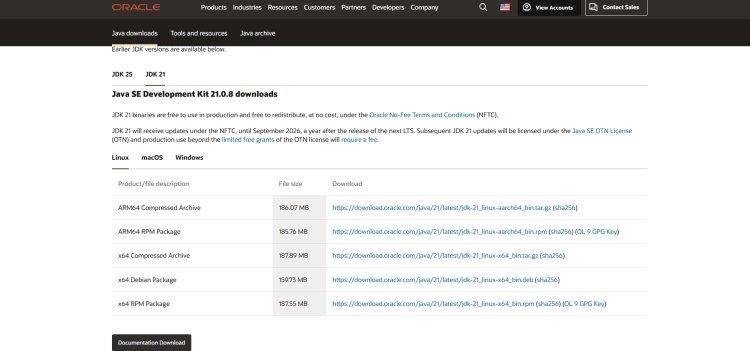
This step is critical. Minecraft 26.1 requires Java 21 or above in order to run. If you don't have Java 21 installed on your PC, the Fabric installer will not open correctly and Minecraft may not launch at all.
Why Do You Need Java for Minecraft?
Minecraft Java Edition is built entirely on the Java programming language. Java acts as the engine that runs Minecraft on your computer. Without Java installed, your PC simply cannot execute the game or any of its modding tools like the Fabric installer. Java 21 specifically brings performance improvements, security patches, and compatibility updates that make Minecraft 26.1 run more smoothly than ever.
Download Java 21 here: https://www.oracle.com/java/technologies/downloads/#java21
Once on the Oracle website, download and install Java 21 or higher for your operating system (Windows, macOS, or Linux). Run the installer and follow the on-screen instructions.
Step 4: Open the Fabric Installer and Select Minecraft 26.1
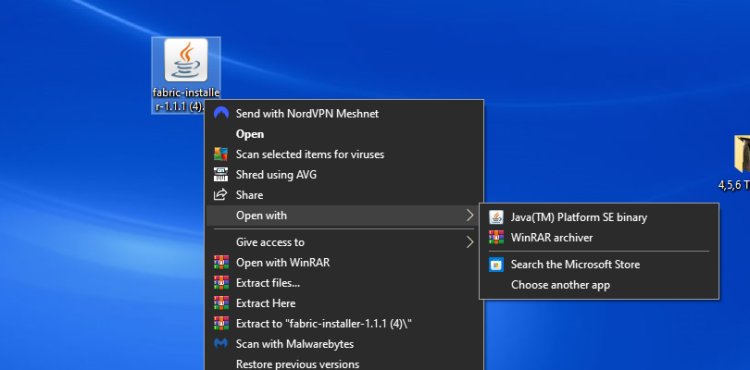
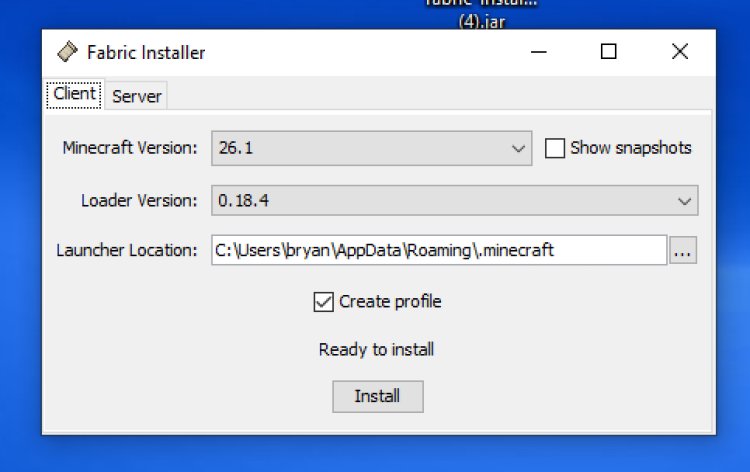
Now that you have Java 21 installed, it's time to run the Fabric Installer.
- Locate the Fabric Installer file you downloaded in Step 1
- Right-click the Fabric Installer file
- Select "Open with Java" from the right-click menu
- The Fabric Installer window will open
- In the Minecraft Version dropdown, select 26.1
- Leave all other settings as default
- Click Install and wait for the installation to complete
Once done, Fabric will automatically create a new profile in your Minecraft Launcher. You're now ready to add mods!
Step 5: Open the Minecraft Launcher and Find Your Mods Folder
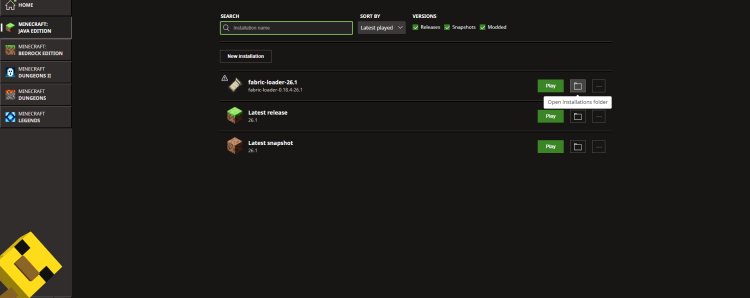
With Fabric installed, open your Minecraft Launcher.
- In the launcher, look for the Fabric installation profile (it should appear automatically after installing Fabric)
- Click the three dots or settings next to the Fabric profile
- Select "Open Installation Folder" or navigate to the folder manually
- Inside the installation folder, look for a folder called "mods"
- Open the mods folder
Tip: If the "mods" folder doesn't exist yet, simply create a new folder and name it mods (all lowercase). Fabric will automatically recognize it.
Step 6: Drag and Drop Sodium Into the Mods Folder
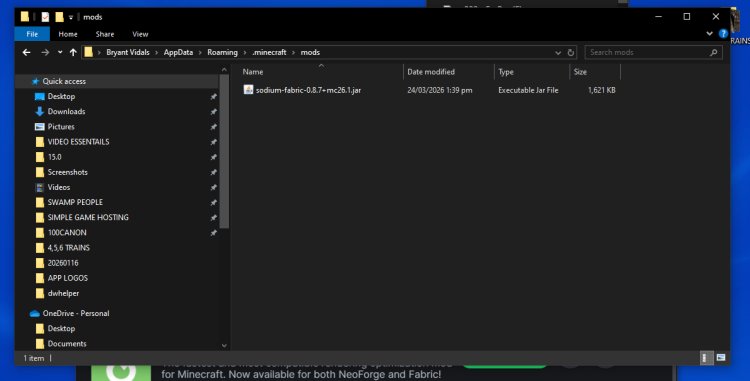
You're almost done! This is the easiest step.
- Locate the Sodium .jar file you downloaded from Modrinth in Step 2
- Drag and drop the Sodium .jar file directly into the mods folder
- Close the mods folder
That's it — Sodium is now installed! Make sure the Sodium file is for Minecraft 26.1 and that no other conflicting optimization mods are in the same folder (like OptiFine, which is not compatible with Sodium).
Step 7: Launch Minecraft 26.1 With Sodium and Enjoy!
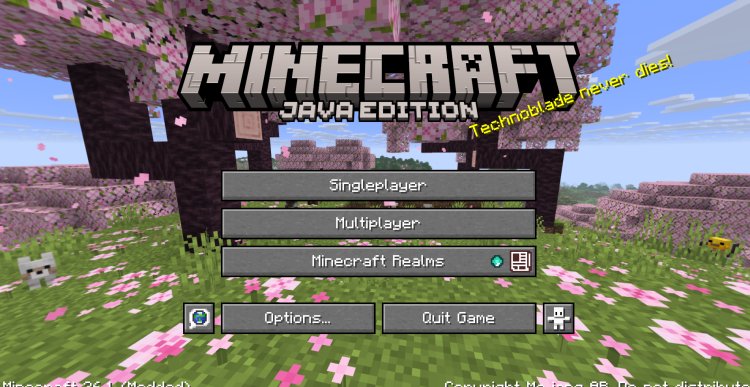
Now it's time to fire up the game!
- Open the Minecraft Launcher
- Select the Fabric 26.1 profile
- Click Play
- Once the game loads, go to Options > Video Settings — you'll notice a completely redesigned video settings menu powered by Sodium
- Enjoy massively improved FPS, smoother gameplay, and reduced lag!
Why You Should Use Sodium for Minecraft 26.1
Still not convinced? Here's why Sodium is the best performance mod for Minecraft:
- Massive FPS boost — up to 3–5x more frames per second
- Lower CPU and GPU usage — great for low-end PCs
- Reduced lag and stuttering — smoother gameplay overall
- Compatible with other Fabric mods — works with Iris, Lithium, Starlight, and more
- 100% free and open-source
- Updated regularly — including full support for Minecraft 26.1
Quick Links Summary
Here are all the download links you need, all in one place:
| What You Need | Download Link |
|---|---|
| Fabric Mod Loader | fabricmc.net |
| Sodium Mod (Minecraft 26.1) | modrinth.com/mod/sodium/versions |
| Java 21 | oracle.com/java/technologies/downloads/#java21 |
Frequently Asked Questions (FAQ)
Q: Is Sodium safe to download for Minecraft 26.1? Yes! Sodium is one of the most trusted and widely used Minecraft performance mods. Always download from the official Modrinth page linked above.
Q: Does Sodium work without Fabric? No. Sodium requires Fabric Mod Loader to function. Make sure to install Fabric first before adding Sodium to your mods folder.
Q: Can I use Sodium with OptiFine? No. Sodium and OptiFine are not compatible. If you want shaders, use Iris Shaders, which is fully compatible with Sodium.
Q: What version of Java do I need for Minecraft 26.1? You need Java 21 or higher. Download it from Oracle's official website linked in Step 3 above.
Q: Why is my Sodium mod not showing up in-game? Make sure the Sodium .jar file is in the correct mods folder, that you're launching the game with the Fabric profile, and that the Sodium version matches Minecraft 26.1.
Final Thoughts
Installing Sodium for Minecraft 26.1 is one of the best things you can do to improve your Minecraft experience. With just a few simple steps — downloading Fabric, grabbing Java 21, and dropping Sodium into your mods folder — you can transform your game performance overnight.
If this guide helped you, share it with your friends and fellow Minecraft players. Happy mining! ⛏️